Software
How to Connect WhatsApp to Your CRM: One Number, a Shared Inbox and No Lost Leads
How businesses move WhatsApp sales chats off staff phones into one shared inbox linked to the CRM, what the WhatsApp Business Platform costs, and what to build.
By Kazim Noorani, Managing Director
To connect WhatsApp to a CRM, you move your business number onto Meta's WhatsApp Business Platform (the Cloud API) and connect it to your CRM, so every chat lands in one shared inbox, is assigned to a person and is linked to the customer's record. Staff stop selling from their own phones, managers can see every conversation, and no lead is lost when someone is busy or leaves. You can use a ready-made inbox tool or build the inbox into a custom CRM, as we did for Truck Sathi and Print Kuch Bhi.
What goes wrong when sales run on personal WhatsApp?
- Leads sit in one person's phone, so nobody else can reply when they are busy, on leave or gone
- Managers cannot see response times, quotes sent or chats that went cold
- The same customer messages two staff members and gets two different answers
- Chats are not linked to orders, payments or delivery, so staff keep asking the customer for details
- When an employee leaves, their customers and history leave with the phone
WhatsApp Business app or the WhatsApp Business Platform?
The free WhatsApp Business app suits a single owner or a very small team: a business profile, quick replies and labels on one phone. It does not connect to a CRM or give a team a proper shared inbox.
The WhatsApp Business Platform, used through Meta's Cloud API, is built for teams. One official number can be used by everyone through an inbox, chats can be assigned and tracked, and messages can be sent from your CRM using templates Meta approves in advance.
What should a WhatsApp CRM inbox do?
- One official number for the whole team, with every chat in one inbox on phone and web
- Automatic assignment, for example round robin, so new chats never wait unclaimed
- Every chat linked to the customer record, their quotes, orders and payments
- Approved templates for quotes, payment links, order updates and reminders
- Unassigned and overdue chats shown to managers, with response times
- Other channels in the same inbox where useful, such as Instagram and Facebook messages
- Roles and permissions, so each person sees the chats they should
Two real examples
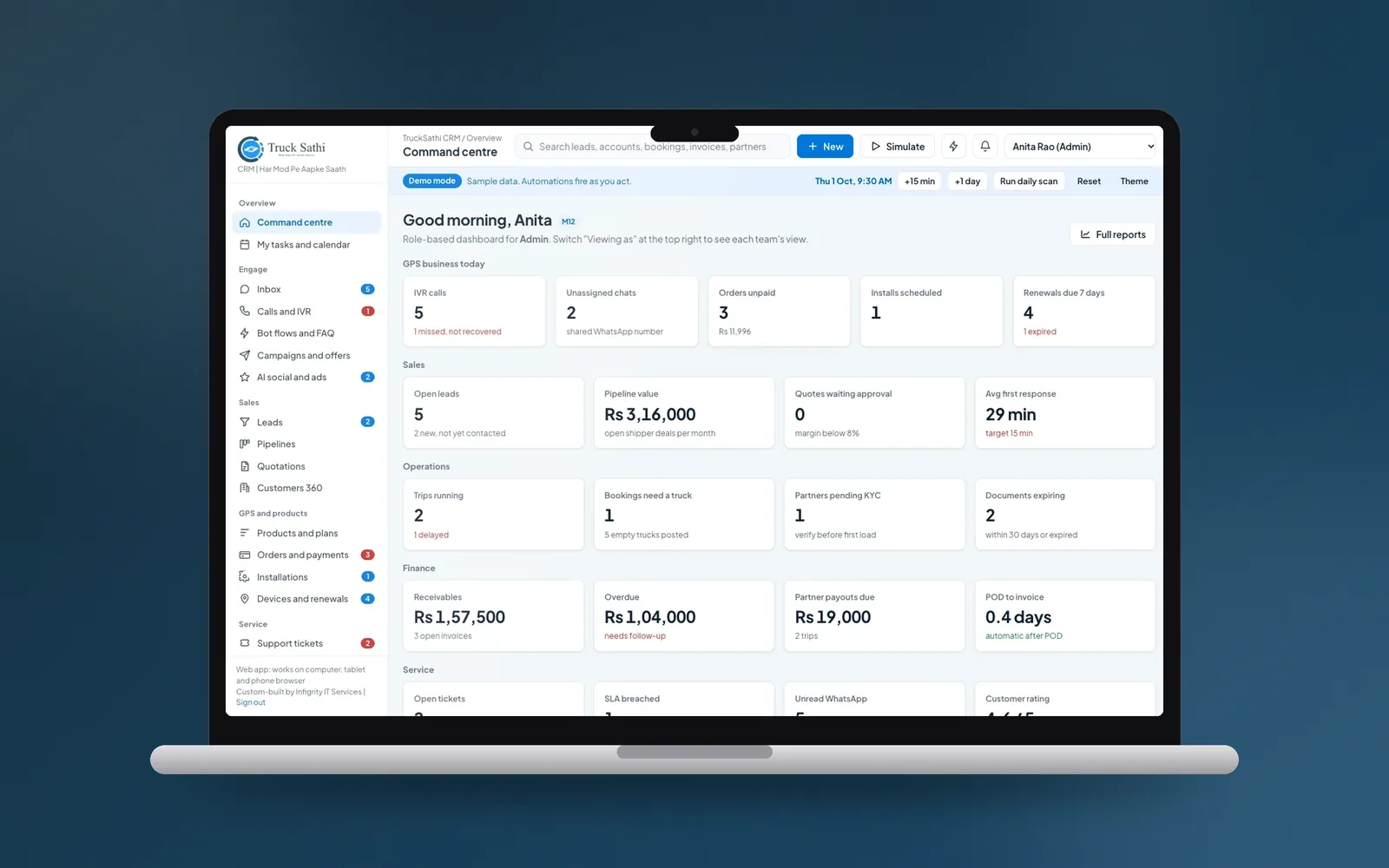
Truck Sathi sells and installs GPS trackers and matches trucks with loads. Leads came from IndiaMART, WhatsApp, calls and the website, and each team kept its own list. Their CRM now has one official WhatsApp number for the whole team on the Meta Cloud API, with templates, round-robin assignment, Instagram and Facebook messages and call records in the same place. A command centre shows unassigned chats next to calls, unpaid orders and installs.
Print Kuch Bhi runs two printing brands with one team, and most orders start as a WhatsApp inquiry. Their CRM links every chat to the customer and their orders, with templates and broadcasts, and takes the job from inquiry to quote, artwork proof, production, dispatch and payment. An AI assistant drafts quotes and replies, and a person always sends.
What does it cost to run?
Meta charges for WhatsApp Business Platform messages by type and by the customer's country. Marketing messages cost the most, utility messages such as order updates cost less, and replies to a customer shortly after they message you cost little or nothing. Meta updates its rates and rules, so check its current rate card for your countries before you plan campaigns.
On top of messages, you pay either a monthly fee for a ready-made inbox tool, usually per user, or a one-off build plus hosting if the inbox is part of a custom CRM. Our custom CRM and software projects start from USD 10,000 for a focused first version.
Ready-made inbox or custom CRM?
A ready-made WhatsApp inbox tool is quickest when you mainly need a shared inbox and your sales process is simple. A custom CRM makes sense when WhatsApp is only the start of the work: quotes, approvals, payments, production, installation or delivery. Then the chat, the order and the money live in one system, which is what made the difference for Truck Sathi and Print Kuch Bhi.
What rules apply?
- Customers must opt in before you send them business-initiated messages, such as offers or reminders
- Messages you start outside a recent customer conversation must use templates Meta has approved
- Follow Meta's commerce and messaging policies, and your country's privacy law for storing chat history
Frequently asked questions
Can I connect WhatsApp to my CRM?
Yes. Move your business number onto the WhatsApp Business Platform (Meta's Cloud API) and connect it to your CRM, through a ready-made inbox tool or a custom integration.
Can several staff use one WhatsApp number?
Yes, through the WhatsApp Business Platform and a shared inbox. Truck Sathi's whole team works from one official number, with chats assigned round robin.
Is the WhatsApp Business app enough?
For one owner or a very small team, often yes. Once several people sell from WhatsApp, or you need chats linked to orders and payments, you need the Business Platform and a shared inbox.
How much does WhatsApp Business messaging cost?
Meta charges per message by category and country. Marketing messages cost the most, and replies shortly after a customer messages you cost little or nothing. Check Meta's current rate card for your countries.
How much does a custom WhatsApp CRM cost?
Our custom CRM projects start from USD 10,000 for a focused first version. The price depends on your teams, channels, integrations and the operations the CRM has to handle.
Related Services
Planning a project like this?
Tell us what you need. We reply within one business day with next steps, a rough timeline and the questions that matter.
More Insights
Custom Property Management Software for UK Letting Agents: What It Costs and What It Must Do
How Much Does a Custom CRM Cost in 2026? And When Is It Worth It?